lunes, 7 de abril de 2014

Arrays

Arrays

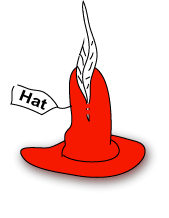
A Hat Many programs deal with large amounts of data. For example, a program that works with images might deal with millions of numbers. If each number were kept in its own variable, there would be millions of variables, each with its own name. This would be awkward. QBasic can use an array to store a large amount of data, avoiding the need for so many variables.

Chapter Topics:

  • Collections of things.
  • Arrays.
  • Subscripts.
  • The LET statment and arrays.
  • Variables as subscripts.
  • Expressions as subscripts.

QUESTION:

Imagine that you had a collection of 500 hats, and that you wanted to name each hat. What scheme could you use to name your hats?

If you own just a few hats, individual names might work, but if you own many hats it is much easier to number them. The first hat is numbered "1," the second hat is numbered "2," and so on up to "500."
Now you could ask for "hat 32" or maybe send "hat 84" out for cleaning. If you add new hats to your collection, you can assign each one a new number in sequence. By using numbers to designate hats, you have a never-ending supply of hat names.
Collections of things often have acquisition numbers like these so that the items of the collection can easily be identified.

QUESTION:

Now imagine that you also have a collection of 100 ties. Can you give each tie its own number?

You feel like stepping out for the night, and look at your collection. You decide to wear
 
hat 73 
tie 19
No problem.
There are two things that are needed to ask for an item:
  1. The name of the collection ("hat" or "tie").
  2. The item number.
The numbering scheme within one collection is independent of other collections. You can have hat number 13 and also have tie number 13, assuming that both exist.

QUESTION:

Say (as before) that you have 500 hats. Can you ask for hat number 577?

In programming, when you have a collection of similar items, each with an item number, the collection is called an array, and the item number is called a subscript.
To refer to a specific item in an array do this:
arrayName( subscript )
The name of the array is followed by the item number (the subscript) inside of parentheses.
For example, say that DAY$ is an array of strings—one for each day of the week. Then,
LET DAY$(1) = "Monday"
makes "Monday" the first string of the array:
  1. DAY$ is the name of the array (the collection of items).
  2. the (1) selects item number 1.

QUESTION:

What (do you suppose) the following does?
LET DAY$(1) = "Monday"
PRINT "The day is", DAY$(1)
(Don't run this program yet. It needs more work.)

Tell QBasic how many items are in your array like this:
DIM arrayName( 1 TO size )
DIM asks for an array. The arrayName is the name of the array. It will have subscripts 1, 2, 3, 4, ... up to size.
Here is how to ask for an array named DAY$ that holds strings numbered from one to seven:
DIM DAY$( 1 TO 7 )

QUESTION:

If DAY$ is as above, is the following statement correct?
DAY$(8) = "Memorial Day"
 
Here is a program that uses an array:
DIM DAY$(1 TO 7) ' Make an array of seven strings. LET DAY$(1) = "Monday" ' Make "Monday" the first string. PRINT "The day is", DAY$(1) ' Print out the first string. END The program is complete. You can enter it into QBasic and run it. It writes out:
The day is Monday When this program begins, it creates an array. The array holds seven items, and each item is a string. Each string starts out as the "empty string"—it contains no characters. Then the string "Monday" is put into the first position. Here is a picture of the array after the first two statements have executed:
Monday


1
2
3
4
5
6
7
The array is a collection of numbered "slots". In this picture there are seven slots, numbered 1, 2, 3, ... 7. "Monday" is in the first slot, DAY$(1).

QUESTION:

Fill in the blank so that "Tuesday" is put into the second slot.
LET DAY$(_____) = "Tuesday" 
 
Here is how this statement would work as part of a complete program:
DIM DAY$(1 TO 7) ' Make an array of seven strings LET DAY$(1) = "Monday" ' Make "Monday" the first item LET DAY$(2) = "Tuesday" ' Make "Tuesday" the second item PRINT "The day is", DAY$(1) ' Print out the first item. END After the second LET statement, the array looks like this:
Monday
Tuesday


1
2
3
4
5
6
7

QUESTION:

Put a statement at the end of the program that will print out the second day.


You can change the data in an array. For example, the following program changes the first item of the array:
DIM DAY$(1 TO 7)               ' Make an array of seven strings
LET DAY$(1) = "Monday"            ' Make "Monday" the first item
PRINT "The day is", DAY$(1)       ' Print out the first item.
LET DAY$(1) = "Manic Monday"      ' Change the first item to "Manic Monday"
PRINT "The day is", DAY$(1)       ' Print out the first item.

END
When the program runs, it will print out:
The day is    Monday
The day is    Manic Monday

QUESTION 8:

Fill in the blanks of the following program so that the array DAY$ is filled with the days of the week, in order:
DIM DAY$(1 TO 7)               ' Make an array of seven strings
LET DAY$(1) = "Monday"            ' Make "Monday" the first item
LET DAY$( _____ ) =  _________    
END 
 
Here is the program that fills every slot of the array with the name of a day:
DIM DAY$(1 TO 7) ' Make an array of seven strings LET DAY$( 1 ) = "Monday" ' Make "Monday" the first item LET DAY$( 2 ) = "Tuesday" LET DAY$( 3 ) = "Wednesday" LET DAY$( 4 ) = "Thursday" LET DAY$( 5 ) = "Friday" LET DAY$( 6 ) = "Saturday" LET DAY$( 7 ) = "Sunday" END After all the slots have been filled, here is how the array looks:
Monday
Tuesday
Wednesday
Thursday
Friday
Saturday
Sunday
1
2
3
4
5
6
7

QUESTION:

Imagine that the following statements are in the program, just before END. Fill in the blanks so that the days of the week are printed out in order.
PRINT "The days are ", DAY$( __ ), DAY$( __ ), DAY$( __ ), DAY$( __ ) PRINT DAY$( __ ), DAY$( __ ), " and " DAY$( __ )
 

The program does not do anything practical. It is just an example of how arrays work. Here is another not-very-practical program: Say that you have an important date this week, and want the program to print out what day it is on. The following program uses the string variable HOTDATE$ to hold the name of the important day. That name will be copied from one of the array slots:
DIM DAY$(1 TO 7)               ' Make an array of seven strings
LET DAY$(1) = "Monday"            ' Make "Monday" the first item
LET DAY$(2) = "Tuesday"    
LET DAY$(3) = "Wednesday" 
LET DAY$(4) = "Thursday"     
LET DAY$(5) = "Friday"    
LET DAY$(6) = "Saturday"     
LET DAY$(7) = "Sunday"    

LET HOTDATE$ = DAY$(5)            ' Copy the fifth DAY$ into HOTDATE$
PRINT "Important date on:", HOTDATE$ 
END

QUESTION:

What does the above program write out?

An expression such as this
DATE$(5)
is called a subscripted variable. The name of the whole array is DATE$. The subscript, 5, is used to pick a single slot of the array. A subscripted variable is the combination of the array name and a subscript.
You can use a subscripted variable anyplace an ordinary variable can go. For example, in the above program a value was copied from a subscripted variable to an ordinary variable:
LET HOTDATE$ = DATE$(5)

QUESTION:

Your Friday evening hot date has been cancelled. Change the statement so that HOTDATE$ is changed to "Saturday" (change only the subscript in the program).

Well, that was easy. To ask for the 6th item in the array, all you do is use subscript 6. What if the 6 is kept in a variable? Inspect the following program:
DIM DAY$(1 TO 7)               ' Make an array of seven strings
LET DAY$(1) = "Monday"            ' Make "Monday" the first item
LET DAY$(2) = "Tuesday"    
LET DAY$(3) = "Wednesday" 
LET DAY$(4) = "Thursday"     
LET DAY$(5) = "Friday"    
LET DAY$(6) = "Saturday"     
LET DAY$(7) = "Sunday"    

LET WHICH = 6
LET HOTDATE$ = DAY$(WHICH)    
PRINT "Important date on:", HOTDATE$ 
END
The program uses correct syntax. The expression DAY$(WHICH) is a correct subscripted variable.

QUESTION:

What will the above program write out?


Remember that when a LET statement executes, it goes through several steps:

A LET Statement

  1. Finds memory for each NEW variable in the statement. (If there are no new variables, this step does nothing.)
  2. Does the calculation on the RIGHT of the equal sign. (If there is nothing to calculate, it just uses the value that is there.)
  3. Replaces the contents of the variable to the LEFT of the equal sign with the result of the calculation.
LET statements used with subscripted variable are no exception. However, a bit of extra work is done to deal with the subscript:
LET WHICH = 6

      +-------  Step 1.  Memory is found for the variable HOTDATE$
      |
      |
LET HOTDATE$ = DAY$( WHICH )
             |     |
             |     |  
             |     +----- Step 2. A value is found for the expression on the RIGHT.
             |                    This now involves getting the value in WHICH,
             |                    then getting the value in DAY$(6), 
             |                    the string "Saturday"
             |
             +------ Step 3.  The value is copied into the variable HOTDATE$

This is easy enough with the above statement, but things can get much more complicated.

QUESTION:

Do things have to get more complicated?

Here is an example of things getting a little bit complicated:
DIM DAY$(1 TO 7)               ' Make an array of seven strings
LET DAY$(1) = "Monday"            ' Make "Monday" the first item
LET DAY$(2) = "Tuesday"    
LET DAY$(3) = "Wednesday" 
LET DAY$(4) = "Thursday"     
LET DAY$(5) = "Friday"    
LET DAY$(6) = "Saturday"     
LET DAY$(7) = "Sunday"    

LET WHICH = 1
LET HOTDATE$ = DAY$(WHICH+2)   
PRINT "Important date on:", HOTDATE$ 
END
In this program, the subscript in the last LET statement is the result of a calculation.

QUESTION:

What does this program write out?

Here are the complicated parts of the program:
LET WHICH = 1
LET HOTDATE$ = DAY$(WHICH+2)   
You can understand what goes on by going through the steps of a LET statement:
  1. First, memory is found for HOTDATE$.
  2. Second, a value for the right of the "=" is calculated:
    • WHICH is replaced with its value: 1
    • The calculation 1+2 is done, resulting in: 3
    • The string in DAY$(3) is found: "Wednesday"
  3. The value "Wednesday" is copied into HOTDATE$
Done!
Go through these steps a few times. Understanding how this works now will save you effort later on.


QUESTION:

How much later on?


FOR Loops

FOR Loops

This chapter discusses another way of doing loops: the FOR statement. FOR statements are especially convenient for implementing counting loops. DO WHILE loops can be used for the same purpose, but are less convenient.

Chapter Topics:

  • The three parts of a loop.
  • The FOR statement.
  • Syntax of the FOR statement.
  • Making tables of values using the FOR statement.
  • Common bugs with FOR statements.
  • Adding up a list of numbers.

QUESTION:

(Review:) What will this loop print out?
' Counting Loop
'
LET COUNT = 0            'Statement 1
'
DO  WHILE COUNT <= 2     'Statement 2
  PRINT COUNT            'Statement 3
  LET COUNT = COUNT + 1  'Statement 4
LOOP 
END
 
 
That was an easy question. But there is a good chance that you got it wrong. This is because there are three things you have to think about to get the correct answer:
  • The starting value of the counter.
  • How the counter is tested in the WHILE.
  • How the counter is incremented in the body of the loop.
The statements that do these things are spread out in the program:
' Counting Loop ' LET COUNT = 0 'Statement 1: start the counter ' DO WHILE COUNT <= 2 'Statement 2: test the counter PRINT COUNT 'Statement 3 LET COUNT = COUNT + 1 'Statement 4: increment the counter LOOP END But all you want to do (in this program) is to count 0, 1, 2.

QUESTION:

Wouldn't it be nice to have an easy way to say "count up from zero to two" (or whatever range you wanted)?

Here is a program that does the same thing as the previous program, but uses a FOR loop to say "count up from zero to two."

' Counting Loop---using a FOR
'
FOR COUNT = 0 TO 2       'Statement 1
  PRINT COUNT            'Statement 2
NEXT COUNT               'Statement 3
END
Statement 1 does three things:
  • It uses the variable COUNT for counting.
  • It starts the count at zero.
  • It lets the count go up to the value 2.

QUESTION:

What statement is in the body of the loop?

It would be OK to say that statement 3 is also in the loop body, but really it is a "bracket" that shows where the loop body ends (like the LOOP statement in a DO WHILE loop.)
' Counting Loop---using a FOR
'
FOR COUNT = 0 TO 2       'Statement 1
  PRINT COUNT            'Statement 2
NEXT COUNT               'Statement 3
END
As always, use indenting to show the statements that are contained between two brackets. The NEXT COUNT has one other purpose: it shows where COUNT changes from its current value to the next value. This change is done automatically. You should not put in a statement to do it.

QUESTION:

What is the next value in this loop after 0?

Here is a diagram that shows how the COUNT changes as the program runs:
' Counting Loop---using a FOR
'
'                    values of COUNT changing over time --->
' 
FOR COUNT = 0 TO 2   0        1         2         3
  PRINT COUNT          0         1         2
NEXT COUNT                1         2         3
END
  • COUNT starts out at 0, stays 0 for the PRINT statement, then changes to 1 at the NEXT COUNT statement.
  • Execution returns to the top of the loop
  • AT the top of the loop COUNT is 1, it stays 1 for the PRINT statement, then changes to 2 at the NEXT COUNT statement.
  • Execution returns to the top of the loop
  • At the top of the loop (again) COUNT is 2, it stays 2 for the PRINT statement, then changes to 3 at the NEXT COUNT statement.
  • Execution returns to the top of the loop
  • Now at the top of the loop it is 3, but 3 is greater than the ending count 2, so the loop is exited.

QUESTION:

What does the following program print?
' Counting Loop 
FOR COUNT = 1 TO 4
  PRINT COUNT
NEXT COUNT        
END
 
You can use any variable for the counter variable in a FOR loop. But usually you should dedicate one variable to the task of counting, and use other variables for what ever other purposes you have. The variable that is dedicated to keeping the count is sometimes called a loop control variable. It is an ordinary numeric variable. There is nothing special about it except in how it is used.
Here is a program that counts from 5 to 10. The loop control variable is named I.
' Counting Loop---count from 5 to 10 ' FOR I = 5 TO 10 PRINT I; ' notice the semicolon, but don't worry about it just now NEXT I END

QUESTION:

What is printed by the above program?

In general, the FOR statement looks like this:
FOR counter = startingValue TO endingValue
  loopBody
NEXT counter
Remember that the term syntax means "the grammar of a program." Syntax tells you how a program (or part of a program) should look. Here are some rules about FOR statements:
  1. The counter is a numeric variable.
  2. You can use counter in the loopBody, but don't change it (this happens automatically with the NEXT.)
  3. startingValue and endingValue can be arithmetic expressions or variables.
  4. loopBody can be any number of statements.
  5. NEXT counter shows the end of the loop body, and shows where counter will change to its next value.
These rules look worse than they are. A few examples will make them clear. Here is a correct program:
' Counting Loop 
'
LET START = 1
LET FINISH = 5
FOR I = START TO FINISH
  PRINT I;         
NEXT I        
END

QUESTION:

Find at least 4 rules from the above list that this program illustrates.

The program is correct, so all the syntax notes are followed. The loop body in this program only has one statement.
  1. counter is a numeric variable.
  2. You can use counter in the loopBody, but don't change it (this happens automatically with the NEXT.)
  3. startingValue and endingValue can be arithmetic expressions or variables.
  4. loopBody can be any number of statements.
  5. NEXT counter shows the end of the loop body.
Here is the program with four of the notes illustrated.
' Counting Loop 
'
LET START = 1      ' Note 3
LET FINISH = 5     ' Note 3
FOR I = START TO FINISH     ' Notes 1 and 3
  PRINT I;                  ' Notes 2 and 4
NEXT I              ' Note 5
END
This program prints the integers from one to five, all on one line.

QUESTION:

Does syntax tell you how the FOR statment works (not just how it looks)?

 
Here is the general form of the FOR (again):
FOR counter = startingValue TO endingValue
  loopBody
NEXT counter
Some rules about how the FOR statement works:
  1. The first time loopBody is executed, counter has the value startingValue.
  2. Each time control hits the NEXT counter statement, counter is increased by 1, and control is sent back to the top.
  3. The final time loopBody is executed, counter has the value endingValue.
  4. If startingValue is greater than endingValue, the loopBody will not be executed even once.
The last rule looks a little odd, but sometimes it is important. Here is a program that illustrates it:
' Counting Loop 
'
LET START = 7
LET FINISH = 5
FOR I = START TO FINISH
  PRINT I;  
NEXT I  
END

QUESTION:

  1. Is the program's syntax correct?
  2. What does the program print out?
The program is correct in syntax. The startingValue in the FOR statement is 7. This is OK so far as syntax goes. The program asks to start I out at 7 and count up to 5. Since I is already larger than 5, the loop is just skipped.
Here is a program where this behavior makes better sense:
' Counting Loop with user input
'
PRINT "What start do you want"
INPUT START
'
PRINT "What finish do you want"
INPUT FINISH
'
FOR COUNT = START TO FINISH
  PRINT COUNT;  
NEXT COUNT
'
END
Sometimes the data input from a user means that only part of a program should execute. It is nice that this happens automatically without additional statements.

QUESTION:

  • If the user types 10 for START and 14 for FINISH what will the program print?
  • If the user types 5 for START and 3 for FINISH what will the program print?
Say that you want a program to write out the squares of numbers from zero to 25. Remember that the square of a number is the number times itself. You want the output to look something like this:
Number       Square
0            0
1            1
2            4
3            9
     . . .
25           625
The program needs to do two things: (i) count from zero to 25, and, (ii) calculate the square of each number. This sounds like a good place for a FOR loop. Here is a start on the program:
' Make a table of squares from 0 to 25
'
PRINT "Number", "Square"
'
LET START = ____________
'
LET FINISH = ____________
'
FOR NUM = START TO FINISH
  PRINT  ______________, _______________   
NEXT NUM
'
END

QUESTION:

Fill in the blanks so that the program works.


String Variables

String Variables

A sequence of characters is called a string. So far we have been using strings for labeling the output of programs. This chapter will discuss more ways to use strings.

Chapter Topics:

  • String variables
  • Names for string variables
  • What characters can be in strings
  • Changing the contents of string variables
  • INPUT with strings
  • Relational expressions and logical expressions with strings

QUESTION:

In all our programs so far, what does a variable hold?

The sequence of characters "Miles per Gallon" in the following program is a string:
LET MILES = 200
LET GALLONS = 10
PRINT MILES / GALLONS, "Miles per Gallon"
END
So far you have been using strings for labeling the output of your programs or for prompting the user to enter a number. This chapter will discuss more ways to use strings.
Computer programs that work with strings are very common. For example, word processing programs manipulate character data. These programs use string variables to hold the character data.
Remember what a variable is:
A variable is a small amount of computer memory that has been given a name. You (the programmer) think of the name you want to use. The QBasic system finds some memory for that name.
So far in this course you have been using numerical variables to store numbers in the computer's memory. For example, the variables GALLONS and MILES in the previous program are numerical variables.
A string variable is a variable that holds a character string. It is a section of memory that has been given a name by the programmer. The name looks like those variable names you have seen so far, except that the name of a string variable ends with a dollar sign, $.
The $ is part of the name. If you forget to put it at the end of a name, the QBasic system will think you want a numerical variable.

QUESTION:

Which of the following are correct names for string variables?
  • NAME$
  • WORDS
  • person$
  • $sum
  • VAL $

Here is a program that uses a string variable.
LET NAME$ = "Sherlock Holmes"
PRINT NAME$
END
When this program is run the following happens:
  1. Execution starts with the first statement:
    • Since the variable NAME$ has not been seen before, the system finds memory for it.
    • The variable starts out empty—there are no characters stored in it.
    • Now the characters from right of the = are copied into the variable.
    • (The quote marks "" are not copied since they are not part of the string.)
  2. Execution continues with the second statement:
    • The characters stored in memory in the variable NAME$ are printed out.
The following will appear on the monitor screen:
Sherlock Holmes

QUESTION:

Here is a slightly different program:
LET NAME$ = Sherlock Holmes
PRINT NAME$
END
What do you think will happen with this new program? (Hint: this is a trick question.)

The correct program is:
LET NAME$ = "Sherlock Holmes"
PRINT NAME$
END
The quote marks are needed to show what characters are part of the string. Without the quote marks it is not clear what the programmer wants.

QUESTION:

Here is the program again, with a slight change:
LET NAME$ = "Sherlock Holmes"
PRINT NAME
END
What do you think will happen with this new program? (Hint: this is another trick question.)


When a string variable starts out (the first time it is seen in a program) it starts out empty. It contains no characters. This is like numerical variables starting out containing a zero. If a string variable is seen for the first time in a LET statement, then it will immediately filled with characters:
LET NAME$ = "Sherlock Holmes"
     |       ---------------
     |              |
     |              |
     |              +--- 2. but the LET statement will immediately
     |                      put these characters in it.
     |
     +---- 1. when NAME$ is created it will be empty.
Usually you don't need to think about this. However if you misspell a variable name, what your program might do is explained by this rule.

QUESTION:

Here is another program:
LET NAME$ = "Professor Moriarty"
PRINT NAM$
END
What do you think will be printed on the screen? (Hint: this is yet another trick question.)

String variables contain strings of characters. The characters can be any printable character on the keyboard, including spaces and punctuation (but not function keys, the enter key, and some others.) In a LET statement you show what characters you want in the string by starting with a quote (  "  ) then typing in whatever you want, then ending with a quote (  "  ) . The quote marks will not be part of the string stored in memory.
Space is a character. It takes up as much memory as any other character. Here is a program that puts a long string into the variable NAME$ .
LET NAME$ = "Dr. John H. Watson, M.D."
PRINT NAME$
END
All the characters between the first and last " are put into NAME$. The spaces, comma, periods, and upper and lower case letters are copied to the variable exactly as in the LET statement.
A string can have very many characters in it. There is a limit to how big it can be, but you won't need to worry about that.

QUESTION:

How many characters are in the following string? (Remember that the quote marks are not part of the string.)

"A B C D "
 
Look at the following program:
' Assignment with numerical variables LET CASH = 100 LET WORTH = CASH PRINT WORTH ' END The first LET statement creates the variable CASH then puts the number 100 into it:
CASH
100
The second LET statement creates the variable WORTH, then gets a number from CASH to copy into WORTH:
WORTH
100
The number in CASH does not change. The program prints 100 to the screen.

QUESTION:

Could the programmer use another LET statement to change the number that is in WORTH?

Just as with numeric variables, string variables can be changed as the program runs. String variables can be changed:
  • In LET statements using string literals.
  • In LET statements using other string variables.
  • In INPUT statements.
Here is an example of the first two:
' Assignment with string variables
'
LET NAME$ = "Luke Skywalker"
PRINT NAME$
'
LET NAME$ = "Darth Vader"
PRINT NAME$
'
LET PERSON$ = NAME$
PRINT PERSON$
'
END
  1. The first LET statement creates NAME$ and puts "Luke Skywalker" into it.
  2. The PRINT statement prints that out.
  3. The next LET statement copies "Darth Vader" into NAME$, replacing what was there before.
  4. The next PRINT statement prints "Darth Vader"
  5. The last LET statement creates PERSON$. Then it gets characters from NAME$ and copies them into PERSON$.
  6. The last PRINT statement prints "Darth Vader" because that is what is in PERSON$
So the screen will look like:
Luke Skywalker
Darth Vader
Darth Vader

QUESTION:

Do you think you can change a string variable by copying a number into it, like:
LET NAME$ = 45.08


Logical Expressions

Logical Expressions

The IF statements and the DO WHILE statements of the previous chapters could only ask simple questions, like COUNT < 10 or HUE >= 16. Often simple questions like these are not enough. This chapters discusses ways to ask more complicated questions.

Chapter Topics:

  • Relational Expressions (review)
  • Logical Expressions
  • AND Operator in QBasic
  • Checking that a number is in range
  • Syntax of Logical Expressions
  • OR Operator in QBasic
  • Comparison between AND and OR

QUESTION:

You have decided to bake some cookies (much cheaper than getting them at the Mall.) An interesting cookie recipe calls for 4 cups of flour and 1 cup of sugar. You look in your supplies and find 3 cups of flour and 2 cups of sugar.
Can you bake cookies with the supplies that you have?

The question about whether you have enough supplies has two parts:
You need at least 4 cups of flour   AND   You need at least 2 cups of sugar
Since you do not have enough flour, you don't have enough supplies.

QUESTION:

What if you had 9 cups of flour and 1 cup of sugar. Now could you follow the recipe?

In order to bake cookies two things must be true:
  • You must have at least 4 cups of flour.
  • You must have at least 2 cups of sugar.
If one of these requirements is false, then you do not have enough ingredients. A QBasic program that follows this logic is:
' Cookie Ingredients Checker
'
PRINT "How much flour do you have"
INPUT FLOUR
PRINT "How much sugar do you have"
INPUT SUGAR
'
IF FLOUR >= 4 AND SUGAR >= 2 THEN
  PRINT "You have enough ingredients"
ELSE
  PRINT "You do not have enough"
END IF
'
END
The IF statement is asking a question with two parts:
IF FLOUR >= 4 AND SUGAR >= 2 THEN
   ----------     ----------
   flour part     sugar part
Each one of these parts is a relational expression (as in the previous chapters.) A relational expression looks at two numbers and gives you TRUE or FALSE.

QUESTION:

Say that you enter 9 for FLOUR and 1 for SUGAR. What answer (TRUE or FALSE) does each of the parts give you?
               
FLOUR >= 4  ________________

SUGAR >= 2  ________________
 
Here is the program again:
' Cookie Ingredients Checker ' PRINT "How much flour do you have" INPUT FLOUR PRINT "How much sugar do you have" INPUT SUGAR ' IF FLOUR >= 4 AND SUGAR >= 2 THEN PRINT "You have enough ingredients" ELSE PRINT "You do not have enough" END IF ' END For you to have enough ingredients, both relational expressions must be TRUE. This is the role of the AND between the two relational expressions. The AND requires that both
FLOUR >= 4 and
SUGAR >= 2 are true before the entire question is true. The entire question must be true in order for the true branch to execute.
The two part question is an example of a logical expression. A logical expression looks at the TRUE and FALSE answers of relational expressions. It will itself give you a TRUE or FALSE.

QUESTION:

Look at the program. How will the monitor screen look if the user types 6 for FLOUR and 4 for SUGAR?

When execution gets to the IF statement, it finds that
FLOUR >= 4   —— true, because 6 >= 4
and
SUGAR >= 2    —— true, because 4 >= 2
Since both sides are true, the two part question gives us TRUE.
AND is used in a logical expression to insist that there is a TRUE on both sides:
this side must be true  AND this side must be true
If both sides are true, the entire AND expression is true. If either side (or both) are false, the entire AND expression is false. AND is called a logical operator because it combines two true/false values into a single true/false value.
A compact way of saying what AND does is:
  • true AND true = true     -- This is the only true.
  • false AND true = false
  • true AND false = false
  • false AND false = false
AND is used to check that every requirement is met.

QUESTION:

Look at the logical expression:
FLOUR >= 4 AND SUGAR >= 2 
What will the expression give us if FLOUR is 2 and SUGAR is 0?


Single-branch IF Statements

Single-branch IF Statements

This chapter looks at more ways to use the IF-THEN-ELSE statement.

Chapter Topics:

  • Single-branch IF statements.
  • Problems with unexpected data.
  • Picking the right relational symbol.
  • Several IF statements in a program.

QUESTION:

You are walking through the Mall and are a little bit hungry. You approach a cookie store and are tempted by the pleasant aromas. What will you do?

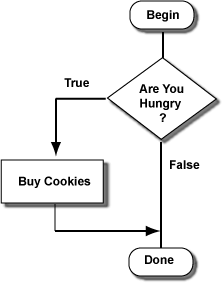
The decision is about whether to buy cookies or just stroll on by. The decision looks like this:
Start at the top, then follow the line to the question:
Are You Hungry?
The answer to the question is either TRUE or FALSE.

If the answer is TRUE,
follow the line labeled TRUE,
to the box "Buy Cookies",
then follow the line to "Done".
If the answer is FALSE
follow the line directly to "Done".

QUESTION:

How is this chart different from the ones in the previous chapter?


The "cookie problem" is about whether to do something extra. The choice is about whether to add a visit to the cookie shop to your shopping trip. Here is a QBasic program that imitates the cookie problem. The user types "1" if hungry, and "0" if not:
PRINT "Enter 1 if you are hungry; 0 if you are not"
INPUT HUNGER
'
IF HUNGER > 0 THEN
  PRINT "Buy Cookies"    ' true branch
END IF
'
PRINT "Keep Shopping"     ' this statement is always done
END
The words IF, THEN, and END IF are brackets that divide the program into branches. This is just like the decisions of the previous chapter, but now the only branch is the true branch.
  • The IF statement always asks a question (usually about the number in a variable.)
  • If the answer is TRUE the true branch is executed.
  • If the answer if FALSE the true branch is skipped.
  • In both cases, execution continues with the statement after the END IF.

QUESTION:

The user runs the program and enters "1". What will the program print?

Here is the program again:
PRINT "Enter 1 if you are hungry; 0 if you are not"
INPUT HUNGER
'
IF HUNGER > 0 THEN
  PRINT "Buy Cookies"    ' true branch
END IF
'
PRINT "Keep Shopping"     ' this statement is always done
END
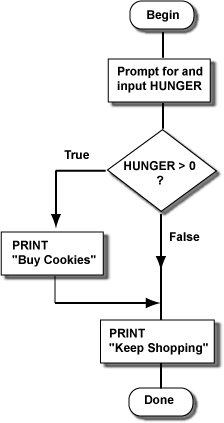
And here is the program as a chart:
Look at both the program and the chart to see how they correspond.

QUESTION:

Say that the user enters a 0. What will the program will print?

Here is the program again.
PRINT "Enter 1 if you are hungry; 0 if you are not"
INPUT HUNGER
'
IF HUNGER > 0 THEN
  PRINT "Buy Cookies"    ' true branch
END IF
'
PRINT "Keep Shopping"     ' this statement is always done
END
The relational expression (the question) in the IF statement tests if HUNGER is greater than zero. If the user enters "1" the expression is TRUE and the "Buy Cookies" branch will execute. But any number greater than zero will also work.

QUESTION:

What will happen if the user enters a 10?

Programs with decisions (or loops) in them are controlled by relational expressions. Relational expressions always give TRUE or FALSE, even for undexpedted data. The user did not follow the instructions, but the relational expression went ahead and used what was entered to get TRUE. Then the true branch was executed. This might not be what the user wanted; perhaps the user thought 10 should mean "thirsty." Computer programs have a hard time with unexpected data, like the 10.
The IF-THEN-END type of decision has only one branch, which is either skipped or not skipped. If there is a block of statements you want to skip sometimes and execute other times you put it in an IF-THEN-END stucture. Now you just have to be sure to ask the right question in the IF.
Say that you are at the Mall again, and have found a nice $44.95 sweater, but might not have enough money to buy it. (You spent too much on cookies.) Here is a program that decides if you can buy the sweater:
PRINT "How much money do you have"
INPUT CASH
'
IF ________________ THEN
  PRINT "Buy the Sweater"    ' true branch
END IF
'
PRINT "done"
END

QUESTION:

What relational expression should be in the blank? (Assume that there is no sales tax.)

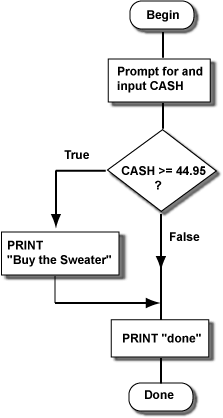
Sweater Program  
Here is what happens for one run of the program:
How much money do you have
? 78.23
Buy the Sweater
done
The true branch was executed because the relational expression was true. Here is another run of the program:
How much money do you have
? 14.96
done
The true branch is skipped because the relational expression was FALSE. Relational expressions always give TRUE or FALSE. Use the correct relational symbol (=, >, <, and others) to ask a question that will be TRUE when you want the true branch to be executed.

QUESTION:

Would the relational symbol < have worked in the above program?


Decision Making

Decision Making

In this chapter you will look at how computer programs make decisions based on numbers and variables. This is done with a statement called the IF-THEN-ELSE statement. This is a very useful statement. It will be an important building block in building up large programs.

Chapter Topics:

  • Two-way Decisions.
  • QBasic IF-THEN-ELSE statement.
  • Outline of a two-way decision.
  • Relational Expressions.
  • Relational Symbols.
  • Example Programs.

QUESTION:

You are driving in your car and it starts to rain. The rain falls on your windshield and makes it hard to see. What should you do with the windshield wipers?

The windshield wipers are controlled with an ON-OFF switch. The decision to turn the switch on looks like this:
two way decision
In this picture of a decision, you are supposed to start at the top, then follow the line to the question:
is it raining?
The answer to the question is either TRUE or FALSE.
If the answer is TRUE, 
     follow the line labeled TRUE,
     do the directions in the box "turn wipers on",
     follow the line to "continue"

If the answer is FALSE
     follow the line labeled FALSE,
     do the directions in the box "turn wipers off",
     follow the line to "continue"

QUESTION:

How many ways can you go from "start" to "continue"?

The "windshield wiper" decision is a two-way decision (sometimes called a "true-false" decision.) It seems small, but in programming very complicated decisions can be made up of many small decisions.
Here is a QBasic program that includes a two-way decision:
PRINT "Enter a Number"
INPUT NUMBER
'
IF NUMBER >= 0 THEN
  PRINT "The number is zero or positive"    ' true branch
ELSE
  PRINT "The number is negative"    ' false branch
END IF
'
PRINT "Bye"     ' this statement is always done
END
The words IF, THEN, ELSE, and END IF are brackets that divide the part of the program into two branches. The ELSE is like a dividing line between the "true branch" and the "false branch".
  • The IF statement always asks a question (usually about the number in a variable).
    • The answer will be TRUE or FALSE.
  • If the answer is TRUE only the true-branch is executed.
  • If the answer is FALSE only the false-branch is executed.
  • No matter which branch was chosen, execution continues with the statement after the END IF.
A two-way decision is like picking which of two roads to take to the same destination. The fork in the road is the IF statement, and the two roads come together just after the END IF statement.

QUESTION:

The user runs the program and enters "12". What will the program print?

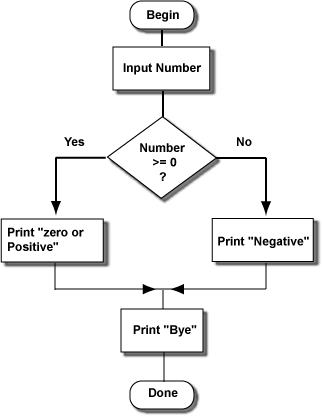
Here is the program again, done as a chart. Because the answer to the question was "true", the path on the left was done.
two way decision in a program
The "two-way split" of the program is easy to see in a two dimensional chart. It is harder to see this in a program.

QUESTION:

The user runs the program and enters "-5". What will the program print?

Here is the program again with some added statements:
PRINT "Enter a Number"
INPUT NUMBER
'
IF NUMBER >= 0 THEN
  PRINT "The number is zero or positive"    ' true branch
  PRINT "Positive numbers are > 0"          ' true branch
ELSE
  PRINT "The number is negative"    ' false branch
  PRINT "Negative numbers are < 0"  ' false branch
END IF
'
PRINT "Bye"     ' this statement is always done
END
The statements in the true branch are executed when the question in the IF statement is TRUE. There can be as many statements as you want in the true branch. The true branch consists of the statements between the IF statement and the ELSE statement.
Of course, the statements in the false branch are executed when the question in the IF statement is FALSE. There can be as many statements as you want in the false branch. The false branch consists of the statements between the ELSE statement and the END IF statement.

QUESTION:

In answer to the question, the user enters a 17. What will the new program print?

Here is how an outline of how to make a two-way decision:
... statements done before the decision
'
IF condition THEN
    ....  ' true branch
    ....  
    ....  ' true branch
ELSE
    ....  ' false branch
    ....
    ....  ' false branch
END IF
'
... statements done after the branch comes back together
Here are some details:
  • The IF condition THEN must be on one line.
  • The condition compares variables and values.
    • The statements in the true branch must be one per line.
    • There can be as many statements in the true branch as you need.
  • The ELSE statement must be by itself on a line.
    • The statements in the false branch must be one per line.
    • There can be as many statements in the false branch as you need.
  • The END IF statement must be by itself on a line.
The condition looks like the part of a DO WHILE condition statement that compares what is held in a variable with other values. You can use the same comparisons: <, <=, =, and so on.

QUESTION:

Is the following program correct?
PRINT "Enter a Number"
INPUT NUMBER
'
IF NUMBER >= 0 THEN
  PRINT "The square root is:", SQR( NUMBER )
ELSE  PRINT "There is no square root"
  PRINT "Run the program again."
END IF
'
PRINT "Bye" 
END
 
The IF, THEN, ELSE, and END IF are like brackets that emphasize the parts of the two-way branch. The QBasic system requires that you put the ELSE and END IF on their own lines to keep the true and false branches clear.
PRINT "Enter a Number" INPUT NUMBER ' IF NUMBER >= 0 THEN PRINT "The square root is:", SQR( NUMBER ) ELSE PRINT "There is no square root"       <---- Wrong!!! PRINT "Run the program again." END IF ' PRINT "Bye" END So the above program is incorrect because the ELSE was not alone on its line.

QUESTION:

How would you fix the above program?


Loops

Loops

Many machines do their work by using repeated motions, cycles. The engine in your car performs the same motions over and over again as it burns gasoline to provide power. Electric motors are similar; they convert electric power into spinning motion. Both of these machines are useful because they do the same things over and over and can keep going as long as we want.
Computer programs, also, use cycles. Much of the usefulness of computer software comes from doing things in cycles. In programming, cycles are called loops. When a program has a loop in it, some statements are done over and over as long as is needed to get the work done. Most computer programs execute millions of program statements each time they are used. Most of these statements are the same statements being executed over and over many times. This chapter discusses loops in QBasic.

Chapter Topics:

  • The DO ... LOOP
  • Using CONTROL-BREAK to exit a loop.
  • The loop body.
  • Indenting loop bodies.
  • Sequential Execution and Looping Combined.
  • The SOUND statement.

QUESTION:

Think of some machines (mechanical or otherwise) that use cycles.

Here is a program that uses a loop:
' Example of a loop
'
DO                        
  PRINT "Type a number"
  INPUT NUMBER
  PRINT "6% of the number is", NUMBER * 0.06
LOOP                     
END
The DO statement marks the beginning of several statements that will be done again and again. The LOOP statement marks the end of those statements. When this program runs this is what happens:
  • The program starts with the DO statement. The DO shows the beginning of the loop.
  • The first PRINT statement is executed and prints "Type a number".
  • The INPUT statement is executed and gets a number to put in the variable NUMBER.
    • Say that the user typed in 100.
  • The second PRINT statement prints "6% of the number is" and then computes and prints six percent of NUMBER.
    • If the NUMBER is 100, the program will print "6% of the number is 6"
  • The LOOP statement marks the end of the loop.
At this point, the statements between DO and LOOP have each executed one time. They are about to execute a second time.

QUESTION:

What does the monitor look like at this time?

Here is the example program, again:
' Example of a loop
DO                       
  PRINT "Type a number"
  INPUT NUMBER
  PRINT "6% of the number is", NUMBER * 0.06
LOOP                     
END
The statements between DO and LOOP have each been executed once. The variable NUMBER has the value 100 in it:
NUMBER
100
Now the statements inside the loop start again with the first statement after DO:
  • For a second time, the PRINT statement prints "Type a number".
  • For a second time, the INPUT statement gets a number to put in the variable NUMBER.
    • Say that the user typed in 50. The number 50 will replace what was previously in the variable.
  • For a second time, the second PRINT statement prints "6% of the number is" and then computes and prints 50 * 0.06.
  • The LOOP statement marks the end of the loop.
At this point, variable NUMBER now has the new value of 50 in it:
NUMBER
50
The monitor now shows:
Type a number
? 100
6% of the number is 6
Type a number
? 50
6% of the number is 3

QUESTION:

What do you suppose happens next. Have the user enter the number 200.

Now the monitor shows:
Type a number
? 100
6% of the number is 6
Type a number
? 50
6% of the number is 3
Type a number
? 200
6% of the number is 12
The variable NUMBER has the new value of 200 in it:
NUMBER
200
The program will continue forever, performing the statements inside the DO ... LOOP again and again. If you run this program, you will have to stop it, somehow. To stop the program, hit CONTROL-BREAK. (Hold down the key marked "Ctrl" then tap the key marked "Break.")

QUESTION:

Why not just let the program run until it ends?

Look again at the program:
' Example of a loop
DO                        
  PRINT "Type a number"
  INPUT NUMBER
  PRINT "6% of the number is", NUMBER * 0.06
LOOP                     
END
The DO and the LOOP are matched like brackets ( ) or [ ]. The statements inside of them will be done over and over, starting with the first enclosed statement and going on in sequence. You can have as many statements as you need between DO and LOOP:
DO     ' start of loop
       '   first  statement to be repeated 
       '   second statement to be repeated
       '   third  statement to be repeated
       '
       '
       '   last   statement to be repeated
LOOP   ' end of loop
END

QUESTION:

Do you see anything in the DO or the LOOP statement that says how many times the statements between them are to be repeated?

The statements between the DO and LOOP are called the body of the loop. So you can say that for the example program, the loop body is repeated endlessly.
Soon you will learn how to write loops that do not repeat endlessly. Sometimes, however, endlessly repeating loops are useful.

A Story Problem

Say that you are in charge of putting price tags on new merchandise in a clothing store. A new shipment of several hundred items has just arrived. You have a list that tells you the wholesale price of each item. The markup in your store is 50 percent, so the price tag should be 1.5 times the wholesale price. You would like a program that asks you for the wholesale price of an item and then prints the retail price, and keeps doing that over and over (since you have hundreds of items).

QUESTION:

In rough outline, what do you suppose the program looks like?
 
The steps you want to repeat are about the same as you would do with paper and pencil. A QBasic program can do them automatically. The DO ... LOOP makes the program cycle endlessly until all the work has been completed. Here is the program:
' Retail price calculator for 50% markup
' 
DO     
  PRINT "Enter wholesale price"            ' ask the user for the wholesale price 
  INPUT WHOLESALE                          ' get the price, put it in a variable
  PRINT "Retail price:", WHOLESALE * 1.5   ' compute and print out the retail price
LOOP  
END

QUESTION:

Say that the first three items have wholesale prices of 100 dollars, 200 dollars, and 50 dollars. What will the monitor look like after you have entered those items?

Here is our program:
' Retail price calculator
' with 50% markup
DO     
  PRINT "Enter wholesale price"            ' ask the user for the wholesale price 
  INPUT WHOLESALE                          ' get the price, put it in a variable
  PRINT "Retail price:", WHOLESALE * 1.5   ' compute and print out the retail price
LOOP  
END
The DO and the LOOP bracket the loop body. To clearly indicate which statements are in the loop body, indent each statement between DO and LOOP. This is as important to programming as grouping sentences into paragraphs is important to writing good English.

QUESTION:

Are prices in a store always marked up by 50 percent?

Here is the situation:
  • A shipment of several hundred items has arrived at your store.
  • You have a list that tells you the wholesale price of each item.
  • The markup is to be a certain percent.
  • The program should repeatedly ask you for the wholesale price of an item and then print the retail price.
Let us say that different shipments have different markups. One shipment might be marked up 50 percent; another might be marked up 100 percent.
So you want a program that first asks the user for the markup percent. It just asks once and then uses that percent for the rest of its work. The program then repeatedly asks for the wholesale price and prints the retail price, as before.

QUESTION:

In rough outline, how will this modified program look? (Hint: the repeated statements are nearly the same as before.)

Here is the QBasic program which follows the outline:
' Retail price calculator
' with markup entered by the user

PRINT "Enter the amount of markup in percent"
INPUT MARKUP
LET RATE = 1 + MARKUP / 100 

DO     
  PRINT "Enter wholesale price"            ' ask the user for the wholesale price 
  INPUT WHOLESALE                          ' get the price, put it in a variable
  PRINT "Retail price:", WHOLESALE * RATE  ' compute and print out the retail price
LOOP
END
Most of the work of the program is done in the DO ... LOOP. The first three statements are done to set things up and need to be done only once. (We are assuming that the MARKUP is the same for all items so we need to enter it only once.)

QUESTION:

The user wishes to run the program using a markup of 10%. What do the first three statements of the new program do? What numbers are stored in MARKUP and RATE?

Here is what happens in detail:
  1. The first statement writes "Enter the amount of markup in percent" on the monitor.
  2. The next statement:
    • Finds memory for the variable MARKUP.
    • Writes a "?" on the monitor.
    • Puts what the user typed (let us say 10) into MARKUP.
  3. The third statement:
    • Needs to calculate a number for 1 + MARKUP / 100
    • So it looks in MARKUP and gets a 10.
    • Does the division first because division is high priority: 1 + 0.1
    • Does the addition: 1.1
    • Puts the resulting number in MARKUP.

QUESTION:

After the first three statements have executed, what happens with the program? (Just say what happens in general; no details are needed.)

So now the program is about to start repeating the statements in the loop body. Memory looks like this:
MARKUP
10
RATE
1.1
Look at the looping part of the program:
' Retail price calculator
' with markup entered by the user
PRINT "Enter the amount of markup in percent"
INPUT MARKUP
LET RATE = 1 + MARKUP / 100
DO     

  PRINT "Enter wholesale price"            ' ask the user for the wholesale price 
  INPUT WHOLESALE                          ' get the price, put it in a variable
  PRINT "Retail price:", WHOLESALE * RATE  ' compute and print out the retail price

LOOP
END
The loop works as it did in the previous program, except that now the multiplication involves two variables. Here is what the screen might look like:
Enter the amount of markup in percent
? 10
Enter wholesale price
? 100
Retail price: 110
Enter wholesale price
? 200
Retail price: 220
Enter wholesale price
? 50
Retail price 55
Enter wholesale price
?
As before, end the program by typing CONTROL-BREAK.

QUESTION:

It might be nice to print out the RATE used to multiply prices after the user enters the MARKUP. Think of a PRINT statement that will do this. Where should it be placed in the above program?

The PRINT statement should be the fourth statement of the sequential statements in front of the DO:
' Retail price calculator
' with markup entered by the user
PRINT "Enter the amount of markup in percent"
INPUT MARKUP
LET RATE = 1 + MARKUP / 100
PRINT "The price multiplier is:", RATE
DO     
  PRINT "Enter wholesale price"            ' ask the user for the wholesale price 
  INPUT WHOLESALE                          ' get the price, put it in a variable
  PRINT "Retail price:", WHOLESALE * RATE  ' compute and print out the retail price
LOOP
END
When the program starts up, the first four statements will be done in sequence:
Enter the amount of markup in percent
? 10
The price multiplier is:    1.1
After that, the program runs as before.

QUESTION:

  • How many times is a statement outside of a loop executed?
  • How many times is a statement inside of a loop executed? 
Often a store has different markups for different items. New Spring clothing might have a markup of 50%. Items like socks might have a markup of 15%. In this situation you would like the markup program to ask for the percent markup for each item. Here is a run of the new program working:
Enter the amount of markup in percent
? 50
The price multiplier is:    1.50
Enter wholesale price
? 100
Retail price:   150
Enter the amount of markup in percent
? 15
The price multiplier is:    1.15
Enter wholesale price
? 100
Retail price:   115
Enter the amount of markup in percent
? 10
The price multiplier is:    1.1
Enter wholesale price
? 100
Retail price:   110
Enter the amount of markup in percent
? 
Notice what is being repeated each time.

QUESTION:

Look at the previous version of the program. How would you modify it so that it performs like the above example? (Hint: no new statements are needed. All you need to do is move some statements to a new place in the program.)

The statements now between the DO and WHILE are repeated each time the loop body is executed.
' Retail price calculator
' with markup entered by the user
' for each item
DO     
  PRINT "Enter the amount of markup in percent"
  INPUT MARKUP
  LET RATE = 1 + MARKUP / 100
  PRINT "The price multiplier is:", RATE
  PRINT "Enter wholesale price"            ' ask the user for the wholesale price 
  INPUT WHOLESALE                          ' get the price, put it in a variable
  PRINT "Retail price:", WHOLESALE * RATE  ' compute and print out the retail price
LOOP
END

QUESTION:

Do statements inside of a loop look much different from those that are not?

Look again at the program's output:
Enter the amount of markup in percent
? 50
The price multiplier is:    1.50
Enter wholesale price
? 100
Retail price:   150
Enter the amount of markup in percent
? 15
The price multiplier is:    1.15
Enter wholesale price
? 100
Retail price:   115
Enter the amount of markup in percent
? 10
The price multiplier is:    1.1
Enter wholesale price
? 100
Retail price:   110
Enter the amount of markup in percent
? 
This is hard to read. The program would be improved if:
  1. It wrote a brief message to greet the user when the program starts out. This should happen just once.
  2. It wrote a blank line after printing each retail price. This can be done with statement that is just the command PRINT, and nothing else on the line.

QUESTION:

Add two new statements to the above program to implement these two new features.


The statements between DO and LOOP are called the loop body. Each time the loop is repeated, these statements are executed in sequence.

QUESTION:

Modify the program so that it writes
Hello World
How are You?
repeatedly.