Decision Making
In this chapter you will look at how computer programs make decisions based on numbers and variables. This is done with a statement called theIF-THEN-ELSE statement.
This is a very useful statement.
It will be an important building block
in building up large programs.
Chapter Topics:
- Two-way Decisions.
- QBasic
IF-THEN-ELSEstatement. - Outline of a two-way decision.
- Relational Expressions.
- Relational Symbols.
- Example Programs.
QUESTION:
You are driving in your car and it starts to rain. The rain falls on your windshield and makes it hard to see. What should you do with the windshield wipers?The windshield wipers are controlled with an ON-OFF switch. The decision to turn the switch on looks like this:

is it raining?The answer to the question is either TRUE or FALSE.
If the answer is TRUE,
     follow the line labeled TRUE,
     do the directions in the box "turn wipers on",
     follow the line to "continue"

If the answer is FALSE
     follow the line labeled FALSE,
     do the directions in the box "turn wipers off",
     follow the line to "continue"
QUESTION:
How many ways can you go from "start" to "continue"?The "windshield wiper" decision is a two-way decision (sometimes called a "true-false" decision.) It seems small, but in programming very complicated decisions can be made up of many small decisions.
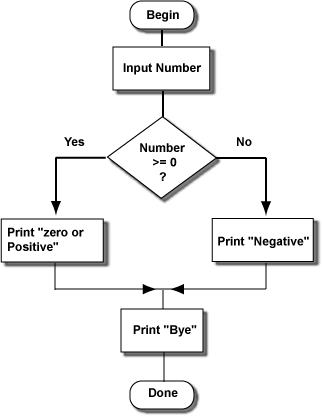
Here is a QBasic program that includes a two-way decision:
PRINT "Enter a Number"
INPUT NUMBER
'
IF NUMBER >= 0 THEN
  PRINT "The number is zero or positive"    ' true branch
ELSE
  PRINT "The number is negative"    ' false branch
END IF
'
PRINT "Bye"     ' this statement is always done
END
The words
IF, THEN,
ELSE, and END IF are brackets that divide
the part of the program into two branches.
The ELSE is like a dividing line between the "true branch" and the
"false branch".
- The
IFstatement always asks a question (usually about the number in a variable).- The answer will be TRUE or FALSE.
- If the answer is TRUE only the true-branch is executed.
- If the answer is FALSE only the false-branch is executed.
- No matter which branch was chosen,
execution continues with the statement after the
END IF.
IF statement, and the two roads come together
just after the END IF statement.
QUESTION:
The user runs the program and enters "12". What will the program print?Here is the program again, done as a chart. Because the answer to the question was "true", the path on the left was done.
QUESTION:
The user runs the program and enters "-5". What will the program print?Here is the program again with some added statements:
PRINT "Enter a Number"
INPUT NUMBER
'
IF NUMBER >= 0 THEN
  PRINT "The number is zero or positive"    ' true branch
  PRINT "Positive numbers are > 0"          ' true branch
ELSE
  PRINT "The number is negative"    ' false branch
  PRINT "Negative numbers are < 0"  ' false branch
END IF
'
PRINT "Bye"     ' this statement is always done
END
The statements in the true branch are executed when the question in the
IF statement is TRUE.
There can be as many statements as you want in the true branch.
The true branch consists of the statements
between the IF statement
and the ELSE statement.
Of course, the statements in the false branch are executed when the question in the
IF statement is FALSE.
There can be as many statements as you want in the false branch.
The false branch consists of the
statements between the ELSE statement
and the END IF statement.
QUESTION:
In answer to the question, the user enters a 17. What will the new program print?Here is how an outline of how to make a two-way decision:
... statements done before the decision
'
IF condition THEN
    ....  ' true branch
    ....
    ....  ' true branch
ELSE
    ....  ' false branch
    ....
    ....  ' false branch
END IF
'
... statements done after the branch comes back together
Here are some details:
- The
IF condition THENmust be on one line. - The condition compares variables and values.
- The statements in the true branch must be one per line.
- There can be as many statements in the true branch as you need.
- The
ELSEstatement must be by itself on a line.- The statements in the false branch must be one per line.
- There can be as many statements in the false branch as you need.
- The
END IFstatement must be by itself on a line.
<, <=, =, and so on.
QUESTION:
Is the following program correct?PRINT "Enter a Number" INPUT NUMBER ' IF NUMBER >= 0 THEN PRINT "The square root is:", SQR( NUMBER ) ELSE PRINT "There is no square root" PRINT "Run the program again." END IF ' PRINT "Bye" END
The IF, THEN, ELSE, and
END IF are like brackets that
emphasize the parts of the two-way branch.
The QBasic system requires that you put the ELSE and
END IF on their own lines to keep the true and false branches clear.
PRINT "Enter a Number" INPUT NUMBER ' IF NUMBER >= 0 THEN PRINT "The square root is:", SQR( NUMBER ) ELSE PRINT "There is no square root" <---- Wrong!!! PRINT "Run the program again." END IF ' PRINT "Bye" END So the above program is incorrect because the
ELSE was not alone on its line.

No hay comentarios:
Publicar un comentario