The INPUT Statement
In this chapter you will learn about
the QBasic
INPUT statement.
The INPUT statement gets data
from the computer keyboard.
Chapter Topics
- Input and Output in a computer system.
INPUTstatement.- Prompting the user.
- Entering number data.
- Using several
INPUTstatements.
' Calculate Miles per Gallon
'
LET MILES = 45678.3 - 45149.6
LET GALLONS = 12.5
PRINT MILES / GALLONS
END
The data is the first odometer reading (45149.6), the second odometer reading (45678.3), and the number of gallons.
QUESTION 1:
Will this program do the same thing each time it is run?Input Devices
Consider the program.LET MILES = 45678.3 - 45149.6 LET GALLONS = 12.5 PRINT MILES / GALLONS ENDEvery time you run the program it will do exactly the same thing. The next time you fill up your gas tank again, you would have to change the program to calculate with the new values. The program is not very useful.
Most useful computer programs input data from various sources when they run. Input means data that comes from outside the program. A program that does this can work with new data each time it is run.
Sources of Input Data
- the keyboard
- a hard disk
- a floppy disk
- a CD-ROM
- the mouse
- a video camera
- an audio digitizer (part of a sound board)
- the Internet
- hundreds of other sources
QUESTION 2:
Pac-man was once a popular game found in video arcades. The game was really a computer program controlling the picture on the video screen. Think of several types of input data that the program used.Output Devices
As they run, most computer programs output data to various places. In programming, output means data that the program sends outside of itself to a some device. For us, output mostly will go to the computer monitor.Output can be sent to:
- the monitor
- a hard disk
- a diskette (floppy disk)
- the printer
- a sound board
- the Internet
- hundreds of other places
QUESTION 3:
Some devices on the list of input devices and on the list of output devices. What were some of these devices?I/O
The hard disk of a computer system is used for both input to a program and output from a program. Other devices are exclusivelyexclusively input devices (such as the
keyboard or mouse) or output devices (such as the printer
and monitor.)
input devices (such as the
keyboard or mouse) or output devices (such as the printer
and monitor.)
Input and Output are so important to a computer system that the abbreviation I/O is used. Any device which does either input, output, or both is called an I/O device. The movement of data from or to such a device is often called "I/O".
QUESTION 4:
Which of the following are NOT I/O devices?- the keyboard.
- a CD-ROM reader
- the CPU
- the power supplypower supply
- the printer cable.
- a floppy disk drive.
The INPUT Statement
QBasic uses the INPUT statement to input data from the
keyboard.
Here is a program that asks the user for a number,
then prints out that number times two:
' Double a Number
'
PRINT "Type a number"     'Ask the user for a number
INPUT NUMBER              'Get it from the keyboard, put it in NUMBER
PRINT NUMBER * 2          'Print the number times two.
END
Here is how this program looks in the QBasic window:

QUESTION 5:
What is the first thing the program writes to the monitorRunning the Program
The first statement is an ordinary PRINT statement that writes a string to the monitor.' Double a Number ' PRINT "Type a number" 'Ask the user for a number INPUT NUMBER 'Get it from the keyboard, put it in NUMBER PRINT NUMBER * 2 'Print the number times two. ENDNow the second statement
INPUT NUMBER executes.
The INPUT statement is used to get data from the keyboard.
It will:
- Print a question mark "?" to the screen.
- Wait until the user has typed in a number.
- Get the number when the user hits the "enter" key.
- Put the number in the variable NUMBER.
Type a number
?
The question mark came from the
INPUT statement.
The INPUT statement is waiting for the user (you) to
type a number. Say that you type 23. Now the monitor
looks like:
Type a number
? 23
To enter the number, hit the enter key. The
INPUT statement puts the 23 into the variable
NUMBER.
Next, the PRINT statement executes.
QUESTION 6:
What will the monitor finally look like?Several Runs of the Program
You can run the program again, without making any change to it. (Push "shift-F5" to start each run.) You can enter different data for each run. Here is an example of three runs of the program: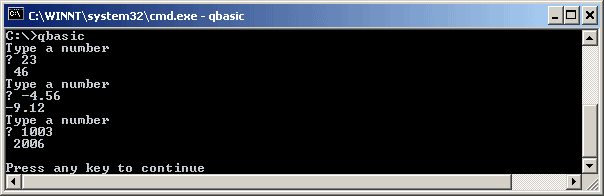
QUESTION 7:
Does the program work with floating point numbers?
Variables with INPUT
The INPUT statement must use a variable as a place to put the
data it gets.
Remember that a variable is
a small amount of computer memory that has been given name.
There is nothing special about the variable used with INPUT.
Here is the same program as before,
except that it uses a different variable name.
It will do exactly the same thing as the first version.
' Double a Number
PRINT "Type a number"     'Ask the user for a number
INPUT MyData              'Get it from the keyboard, put it in MyData
PRINT MyData * 2          'Print twice the number.
END
The variable should be the correct type for the expected input.
Remember (from chapter 3) that the last character of a variable name
indicates what the variable is expected to hold.
For example, a variable VALUE# can potentially hold a
very big floating point number.
A variable DATA% is expected to hold an integer
(no decimal point).
Here is a program that does input of an integer:
' Integer Input
PRINT "Type an integer"   'Ask the user for an integer
INPUT DATA%               'Get it from the keyboard, put it in DATA%
PRINT DATA% * 2           'Print twice the number.
END
QUESTION 8:
Say that the user types 1.2 when theINPUT statement
of this program asks for data.
What will the monitor show after the user hits "enter"?Nice Variable Names
For these notes, programs will mostly use ordinary variables likeNUMBER that do not have a special character
at the end of their name.
These variables can hold a useful range of floating point numbers.
If you enter a number like "1" (which you might think is an integer)
the number is stored in the variable as "1.0" which is really the same thing.
This avoids problems like the above.
Usually a program is written to solve a problem dealing with things in the world. Numbers are input to the program that describe real things. It is very useful to use variable names that describe what the numbers mean.
Here is a program that asks the user for the number of fluid ounces and calculates the number of gallons. Notice how the names of the variables make it much easier to see what is going on:
' Convert Fluid ounces to Gallons
'
PRINT "Enter number of fluid ounces"
INPUT OUNCES
PRINT "Number of gallons:", OUNCES / 128
END
QUESTION 9:
Write a program that asks the user for the number of grams and prints the number of kilograms. There are 1000 grams per kilogram. Use the above program as a model.(Write this program with paper and pencil, or just "think" it. The best thing to do would be to use QBasic to write the program and run it before you go on.)
Prompting the User
Say the above program were run and that the user entered 734 grams. The monitor would look like:Enter number of grams ? 734 Number of kilograms: 0.734The string "Enter number of grams" is called a prompt. A prompt is a short phrase which tells the user of a computer program what is expected. The program is said to prompt the user for input.
You should be careful that the prompt makes sense to the user of a program. The prompt is for the user; it doesn't "tell" the
INPUT statement what to do.
Here is a poorly written version of the
"grams to kilograms" program:
' Convert grams to kilograms
PRINT "Enter number"
INPUT GRAMS
PRINT "result:", GRAMS / 1000
END
When this program is run, and the user enters data as before, the user sees:
Enter number
? 734
result:    0.734
The answer is correct, and Mr. Spock might be happy with the program (since "logically" the two programs are the same). But the second version is not user-friendly and is prone to user error. Maybe the user though the program was converting ounces to pounds. Nothing on the monitor would correct this mistaken notion.
QUESTION 10:
Write a program which converts OUNCES to POUNDS. The program should write an informative prompt to the user,INPUT the number of ounces, then write the number of
pounds.
No hay comentarios:
Publicar un comentario