Single-branch IF Statements
This chapter looks at more ways to use theIF-THEN-ELSE
statement.
Chapter Topics:
- Single-branch
IFstatements. - Problems with unexpected data.
- Picking the right relational symbol.
- Several
IFstatements in a program.
QUESTION:
You are walking through the Mall and are a little bit hungry. You approach a cookie store and are tempted by the pleasant aromas. What will you do?The decision is about whether to buy cookies or just stroll on by. The decision looks like this:
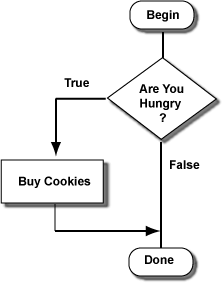
Are You Hungry?The answer to the question is either TRUE or FALSE.
If the answer is TRUE,follow the line labeled TRUE,If the answer is FALSE
to the box "Buy Cookies",
then follow the line to "Done".follow the line directly to "Done".
QUESTION:
How is this chart different from the ones in the previous chapter?The "cookie problem" is about whether to do something extra. The choice is about whether to add a visit to the cookie shop to your shopping trip. Here is a QBasic program that imitates the cookie problem. The user types "1" if hungry, and "0" if not:
PRINT "Enter 1 if you are hungry; 0 if you are not"
INPUT HUNGER
'
IF HUNGER > 0 THEN
  PRINT "Buy Cookies"    ' true branch
END IF
'
PRINT "Keep Shopping"     ' this statement is always done
END
The words
IF, THEN, and END IF
are brackets that divide
the program into branches.
This is just like the decisions of the previous chapter,
but now the only branch is the true branch.
- The
IFstatement always asks a question (usually about the number in a variable.) - If the answer is TRUE the true branch is executed.
- If the answer if FALSE the true branch is skipped.
- In both cases, execution continues with the statement
after the
END IF.
QUESTION:
The user runs the program and enters "1". What will the program print?Here is the program again:
PRINT "Enter 1 if you are hungry; 0 if you are not"
INPUT HUNGER
'
IF HUNGER > 0 THEN
  PRINT "Buy Cookies"    ' true branch
END IF
'
PRINT "Keep Shopping"     ' this statement is always done
END
And here is the program as a chart:
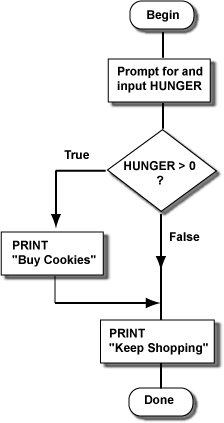
QUESTION:
Say that the user enters a 0. What will the program will print?Here is the program again.
PRINT "Enter 1 if you are hungry; 0 if you are not"
INPUT HUNGER
'
IF HUNGER > 0 THEN
  PRINT "Buy Cookies"    ' true branch
END IF
'
PRINT "Keep Shopping"     ' this statement is always done
END
The relational expression (the question) in the
IF
statement tests if HUNGER is greater than zero.
If the user enters "1" the expression is TRUE and the
"Buy Cookies" branch will execute.
But any number greater than zero will also work.
QUESTION:
What will happen if the user enters a 10?Programs with decisions (or loops) in them are controlled by relational expressions. Relational expressions always give TRUE or FALSE, even for undexpedted data. The user did not follow the instructions, but the relational expression went ahead and used what was entered to get TRUE. Then the true branch was executed. This might not be what the user wanted; perhaps the user thought 10 should mean "thirsty." Computer programs have a hard time with unexpected data, like the 10.
The
IF-THEN-END type of decision
has only one branch, which
is either skipped or not skipped.
If there is a block of statements you want to skip sometimes and
execute other times you put it in an
IF-THEN-END stucture.
Now you just have to be sure to ask the right question in the IF.
Say that you are at the Mall again, and have found a nice $44.95 sweater, but might not have enough money to buy it. (You spent too much on cookies.) Here is a program that decides if you can buy the sweater:
PRINT "How much money do you have"
INPUT CASH
'
IF ________________ THEN
  PRINT "Buy the Sweater"    ' true branch
END IF
'
PRINT "done"
END
QUESTION:
What relational expression should be in the blank? (Assume that there is no sales tax.)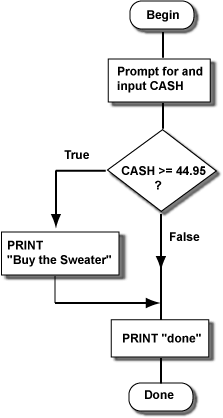
Here is what happens for one run of the program:
How much money do you have
? 78.23
Buy the Sweater
done
The true branch was executed because the relational expression was true. Here is another run of the program:
How much money do you have
? 14.96
done
The true branch is skipped because the relational expression was FALSE. Relational expressions always give TRUE or FALSE. Use the correct relational symbol (
=, >, <, and others)
to ask a question that will be TRUE when you
want the true branch to be executed.
QUESTION:
Would the relational symbol< have worked in
the above program?

No hay comentarios:
Publicar un comentario